
Splitting a party venue cost: should a late joiner pay less?
No install, no sign-up. 100% free.
For example, a birthday party at a rented venue (4)
3 were there from the start and 1 joined later. Different people paid for the venue, food and drinks.
Split 4 ways? Latecomer pays the same? Who pays whom back?
With FAMI-KAN, just set the ratios
Who pays whom
HIGHLIGHTS
accounts or installs
Just paste a link in your group chat.
entries and members
No daily caps, no paid plan.
currencies, 8 languages
Works for trips abroad and mixed-language groups.

Easy-to-read payment history
Who paid for what, in a history grouped by date. You can also check who carries which ratio at any time.

Shared pot (deposits) supported
Collect money up front; refunds and top-ups are settled automatically. Rare among no-sign-up apps.
ABOUT THIS APP
What FAMI-KAN is
From everyday bills to trips, decide fairly who pays how much.
Adults 1.0, kids 0.5.
Split per person or per household, and set any ratio. Everyone's share is calculated automatically.
Just share a link.
No app to install, no account to create. Everyone adds what they paid from their own phone.
Who pays whom, how much. Instantly.
The fewest transfers to settle up, and every calculation visible to everyone. No black box.
HOW IT WORKS
How it works, in 4 steps

1Add households and set ratios
Adults 1.0, kids 0.5. Each household's total ratio is computed for you.
2Everyone enters what they paid
One family paid the rental car, another the hotel. Each from their own phone.

3Here's the result
Who pays whom, how much, in the fewest transfers.
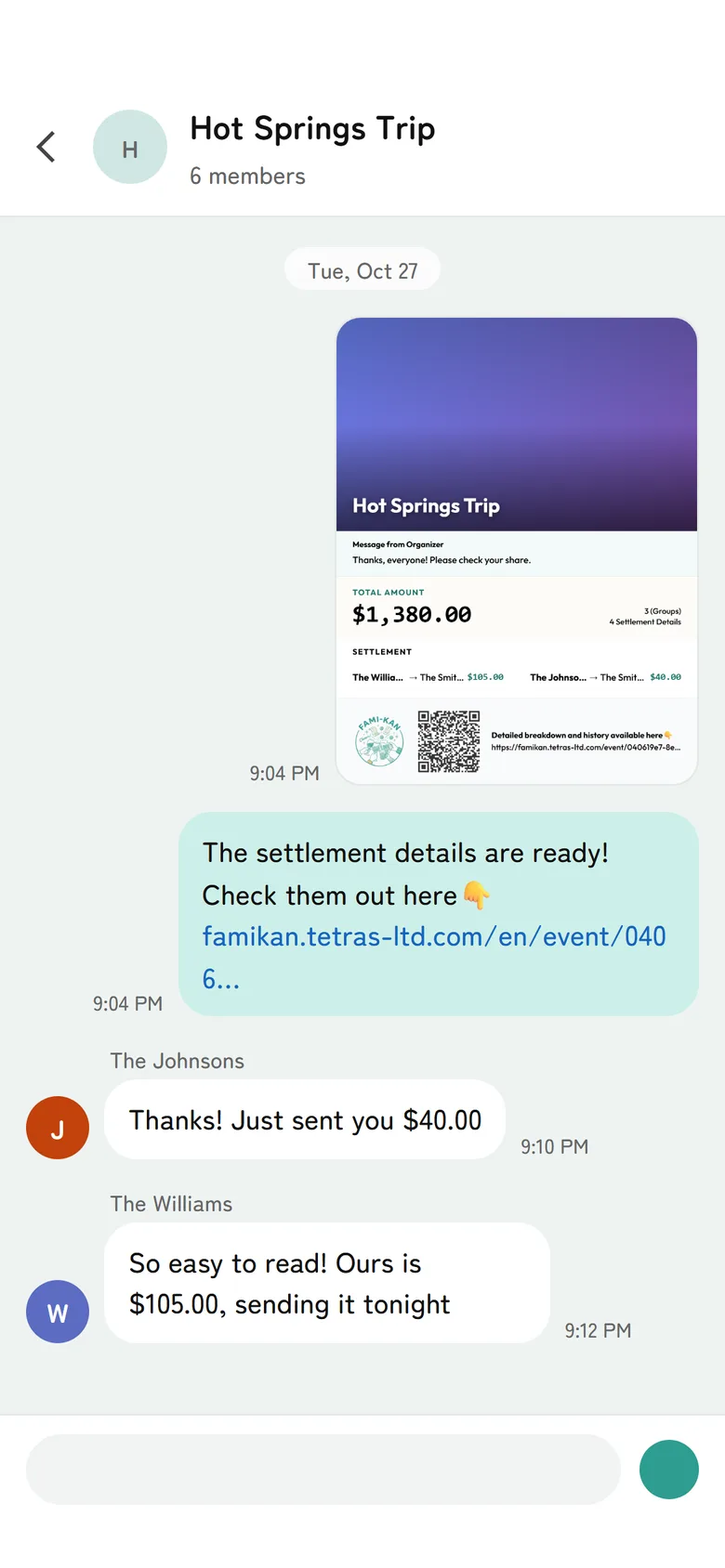
4Send it and you're done
Share the result as one image, or copy the text for payment apps.
MoreHistory by date
Who paid for what, grouped by day. You can re-sort it too.
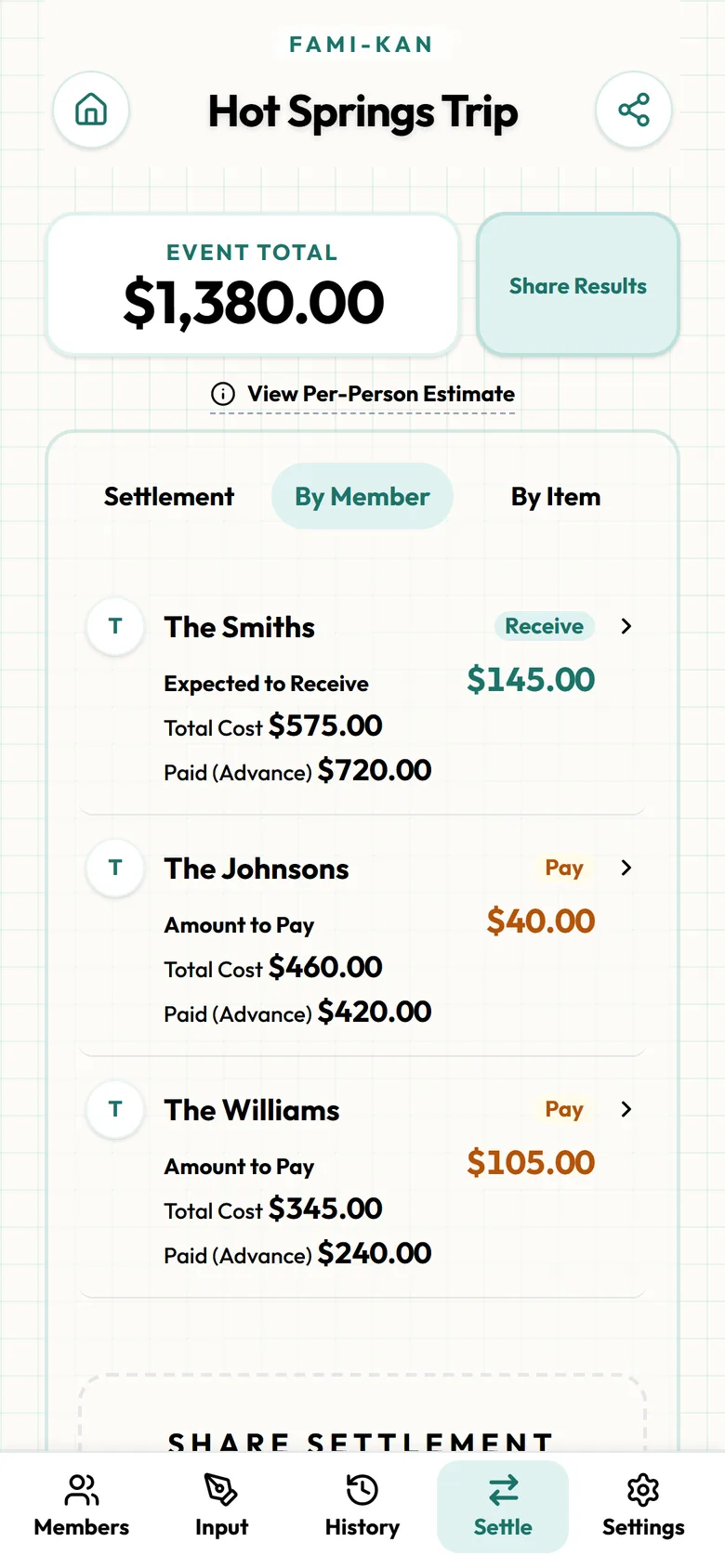
MoreBy Member
Each family's share, what they paid, and what they get back or owe.
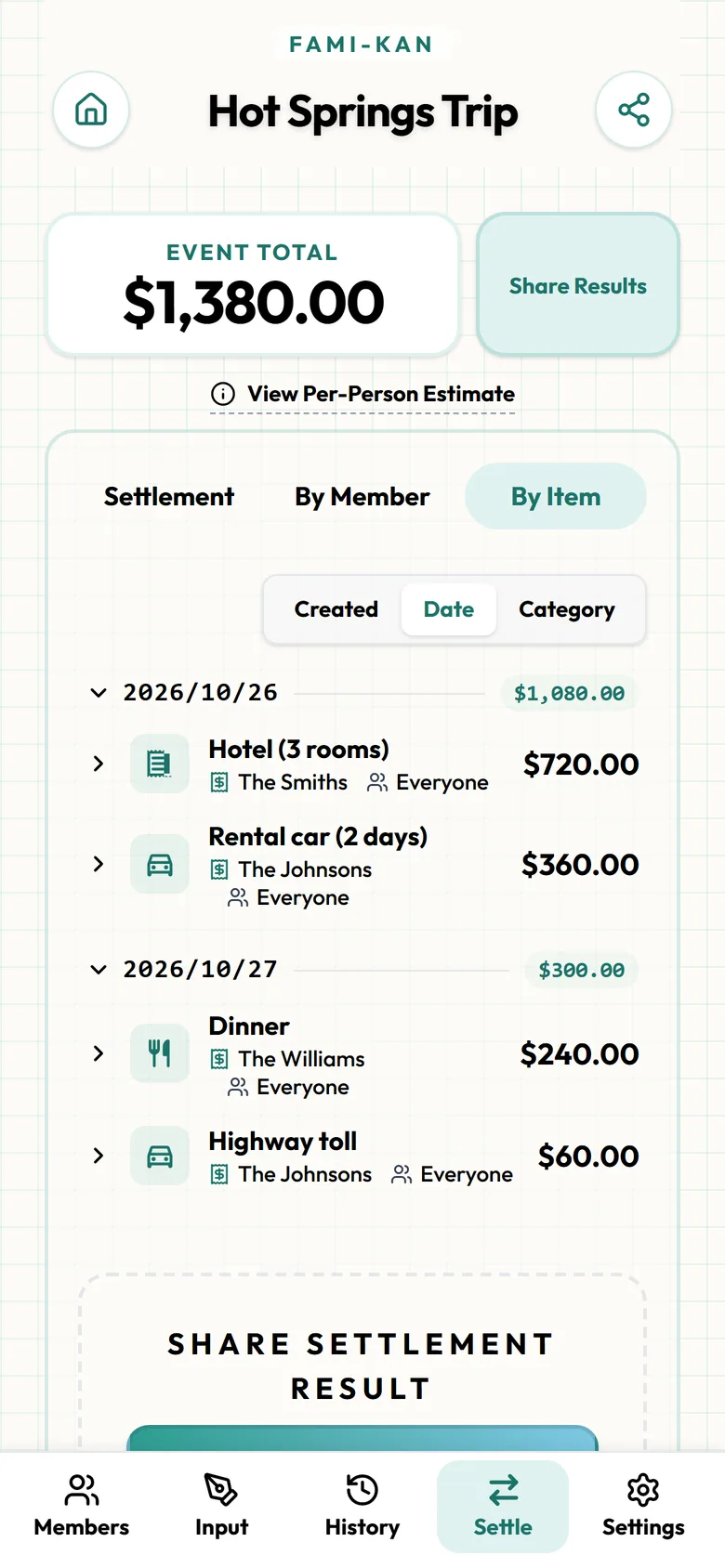
MoreBy Item
What the money went on, by date or by category.

MoreSettlement card
One image to post in the group chat. The QR code opens the full details.
Any of these sound familiar?
Who booked the room?
Exempt non-drinkers?
Latecomer discounts?
→ Split venue rentals and food costs fairly.
Combine Airbnb booking fees, catering, and alcohol costs into a single shared link. Exclude late arrivals from dinner costs or apply custom percentages instantly. No signup required. Completely free.
Don't let tedious money calculations ruin a great memory.
I paid the Airbnb fee, someone else bought all the liquor.
Log both expenses. FAMI-KAN calculates whether the liquor buyer needs to pay you, or if everyone else owes you both.
Some people just came for an hour, should they pay full price?
Adjust ratios for latecomers (e.g. 0.5 share) or easily exclude people from specific expenses like 'Dinner'.
I feel bad asking guests for money after hosting.
Share the link before or during the party. Everyone knows the score, and they can settle up without you directly asking.
FAMI-KAN needs no sign-up and no install. Set a ratio once — Adult 1.0, Child 0.5 — and it applies to every expense after that. We compare it with other apps, including where they do better.
Why FAMI-KAN is Best
A late joiner paying less makes sense for what they missed, such as food that was served before they arrived, while the venue itself was booked for everyone and cost the same either way. One way to decide is to split the venue evenly and give latecomers a reduced share of the food and drinks only. Say 10 people share a $400 venue, and 2 of them arrive at 8 p.m. after most of the $360 in food and drinks is gone. The venue is $40 each. For the food, give the latecomers 0.5: the total ratio is 9.0, so on-time guests pay $40 and latecomers $20. On-time guests pay $80 in total, latecomers $60. In FAMI-KAN, log the venue fee under whoever booked it and the food and drinks under whoever bought them. On the food payment, use "Change shares for this payment only" to set latecomers to 0.5, or untick them entirely if they didn't eat. If latecomers should pay less on everything, set a Late category at 0.5 instead. Everyone sees the result on the same link.
Simple 3-Step Guide
No app downloads or accounts needed.
- 1
Create the party event
Start an event, name it after the party and add the guests.
- 2
Log the booking
Enter the venue fee under whoever booked it, even if it was paid weeks earlier.
- 3
Add food and adjust for latecomers
Log food and drinks as they're bought. Set latecomers to 0.5 on those payments, or untick them.
- 4
Send the result
Share the link, or send a postcard image of who pays whom to the group chat.
Why we built FAMI-KAN
FAMI-KAN isn't just a calculator. It's a partner that handles the math so you can focus on what matters: "That dinner was amazing", "Where should we go next?" — preserving the afterglow of time well spent together.
Read more
The worst part of any trip comes at the very end — when everyone's tired and someone has to sort out the money. Lining up receipts, punching numbers into a calculator, trying to remember who paid what... it brings a cold, transactional feeling to what should be warm memories.
Existing apps are useful, but often too complex or require everyone to install the same app. For family gatherings spanning multiple generations, we needed something simpler — and warmer.
Need business-style splitting?
FAMIKAN Smart for Business & Dinners
"Seniors pay more", "Students pay less", "Late arrivals get adjusted" — complex tiered splits are set up in seconds with presets. Features like edit-locking and graph-enabled share text are built for organizers.
- • Role-based tiered split presets
- • Edit lock & graph-enabled sharing
- • Perfect for work dinners & mixers
Frequently Asked Questions
The booking cost doesn't shrink when someone arrives late, so an even split of the venue is easy to defend. Food and drinks are different, since a latecomer may have missed most of them. Splitting the two separately lets you treat each fairly.
A ratio such as 0.5 scales with the size of the bill, so it works whether the food came to $200 or $600. A Special Rule such as "Late -$10" takes a fixed amount off their share and spreads it across everyone else.
Untick them under "Target Members" on the food payment so they share only the venue, or only the drinks they had. Every other guest's share adjusts automatically.
If it comes back in full, leave it out. If part of it is kept, for example for cleaning, enter only the amount that was kept as an expense.
Record each person's contribution with "Give to Organizer" and choose "Organizer pays" for purchases made from that money. The settlement works out who gets money back and who still owes.
That's for your group to decide. If they're still covering their share of the booking, keep them on the venue payment and untick them on the food and drinks.
Yes. Every bill-splitting and settlement feature is free to use, and no registration is required.
No. It runs entirely in your web browser. Just share the link and everyone can access it immediately on their phones.
Yes, you can select the currency when creating an event (almost every official currency in the world). You can unify calculations easily for trips abroad.
Yes. You can switch between three views — "Settlement", "By Member" and "By Item". You can see what each person paid and owes, and for any single expense, who is covering how much. Everyone sees why the number is what it is, on the same screen.