
Auch knifflige Abrechnungen? Mit einem Tippen gelöst. Ein eigenes Verhältnis pro Person. Das Rechnen übernimmt das Handy.
Intuitive Bedienung
Kommt dir das bekannt vor?
Lass dir die schöne gemeinsame Zeit nicht von der Rechnerei am Ende verderben.
Erwachsene und Kinder, die kaum etwas essen, zahlen gleich viel? Das fühlt sich nicht richtig an …
Wähle, ob pro Person oder pro Familie aufgeteilt wird, und lege Verhältnisse wie „Erwachsene = 1,0, Kinder = 0,5“ fest. Die App berechnet den fairen Anteil aller automatisch.
Immer lege ich alles vor – und später nach dem Geld zu fragen ist unangenehm …
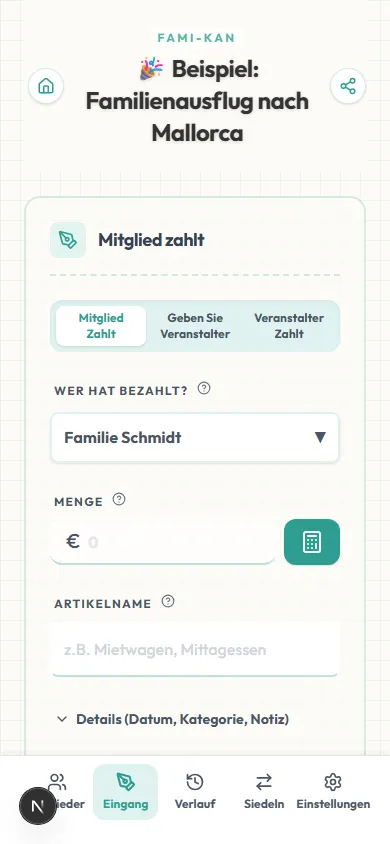
Einfach den Link teilen – jeder trägt vom eigenen Handy ein, was er ausgelegt hat. Niemand muss Belege sammeln, und du musst niemandem hinterherlaufen.
Am letzten Tag Belege sammeln und den Taschenrechner zücken – das killt die Stimmung …
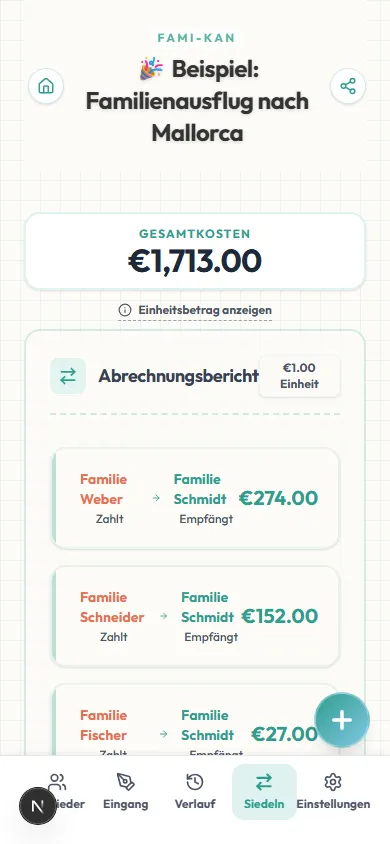
Am Ende einfach die Seite öffnen: Wer zahlt wem wie viel? Das steht sofort da. Das Rechnen erledigt die App – du sammelst nur noch ein.
Bei anderen Apps sehe ich nur, wem ich was schulde, aber nie genau, wie sich der Betrag berechnet...
FAMI-KAN bietet eine vollständig transparente Berechnung. Du siehst jederzeit genau, warum du welchen Betrag schuldest – inklusive Basispreis und deines individuellen Verhältnisses. Keine Black-Box-Berechnungen mehr.
Perfekt für jeden Anlass
Von der kleinen Alltagsrechnung bis zur großen Gruppenreise.
Familienreisen & Verwandtentreffen
Wenn mehrere Familien mit unterschiedlich vielen Kindern zusammen verreisen, spielt FAMI-KAN seine Stärke aus. Leg Verhältnisse für Erwachsene und Kinder fest, und das System berechnet den fairen Anteil jedes Haushalts automatisch.
- • Verhältnis Erwachsene/Kinder berechnen
- • Gesamtbetrag pro Familie (Haushalt)
- • Benzin & Maut pro Auto abrechnen
Abendessen, Partys & Treffen
„Wer später kommt, zahlt weniger“, „Nichttrinker bekommen einen festen Rabatt“ – jede individuelle Anpassung ist im Handumdrehen erledigt. Direkt vor Ort eintragen, per LINE oder Messenger teilen, fertig.
- • Festbetrag-Anpassungen pro Person
- • URL sofort teilen
- • Kopierfreundliche Anzeige für Bezahl-Apps
Warum wir FAMI-KAN gebaut haben
Der schlimmste Teil jeder Reise kommt ganz am Ende – wenn alle müde sind und jemand das Geld klären muss. Belege sortieren, Zahlen in den Taschenrechner tippen, sich erinnern, wer was bezahlt hat … Das bringt eine kalte, geschäftsmäßige Note in etwas, das eine warme Erinnerung sein sollte.
Bestehende Apps sind nützlich, aber oft zu komplex, oder alle müssen dieselbe App installieren. Für Familientreffen über mehrere Generationen brauchten wir etwas Einfacheres – und Wärmeres.
FAMI-KAN ist nicht nur ein Rechner. Es ist ein Partner, der das Rechnen übernimmt, damit du dich auf das konzentrieren kannst, was zählt: „Das Essen war fantastisch“, „Wo geht's nächstes Mal hin?“ – damit der schöne Nachklang gemeinsamer Zeit erhalten bleibt.
Brauchst du eine Abrechnung im Business-Stil?
FAMIKAN Smart für Business & Geschäftsessen
„Ältere Kollegen zahlen mehr“, „Studierende zahlen weniger“, „Wer später kommt, wird angepasst“ – komplexe gestaffelte Aufteilungen nach Position sind mit Presets in Sekunden eingerichtet. Funktionen wie Bearbeitungssperre und Teilen-Text mit Diagramm sind speziell für Organisatoren gemacht.
- • Gestaffelte Aufteilungs-Presets nach Rolle
- • Bearbeitungssperre & Teilen mit Diagramm
- • Ideal für Geschäftsessen & Kennenlernabende
Häufige Fragen
Gruppenreisen, Junggesellenabschiede, WGs, die sich Rechnungen teilen, Paare mit gemeinsamen Ausgaben und Familienfeiern.
Ja, es ist perfekt für Gruppenaktivitäten von Schülern und Studierenden. Da keine Registrierung nötig ist und du nur eine URL per WhatsApp oder LINE schicken musst, kannst du sofort loslegen – auch mit einer ganzen Klasse von 40 Leuten oder einem großen Verein.
Absolut. Ob mehrere Personen bei einer Konzertreise Hotel und Zug getrennt vorstrecken oder Fans die Kosten für ein Geschenk teilen – FAMI-KAN macht die Abrechnung jeder Gruppenaktivität drastisch einfacher.
Definitiv. Es ist als Haushaltstool sehr beliebt: Jeder trägt täglich ein, was er für Lebensmittel oder Strom bezahlt hat, und am Monatsende wird alles auf einmal abgerechnet.
Ja. Es ist ein hervorragend einfaches Werkzeug für den geschäftlichen Alltag – etwa wenn eine Mittagsrechnung anhand eines einzigen Belegs aufgeteilt werden soll.
Ja! Du kannst aus 62 wichtigen Währungen wählen (USD, EUR, GBP, KRW, TWD und mehr).
Ja. Der Abrechnungsbildschirm bietet drei Ansichten, zwischen denen du wechseln kannst: „Abrechnung“, „Nach Mitglied“ und „Nach Posten“. In „Nach Mitglied“ siehst du für jede Person sowohl das, wofür sie bezahlt hat, als auch das, was sie anteilig trägt. In „Nach Posten“ ist es umgekehrt – für jeden einzelnen Posten siehst du, wer wie viel trägt, sortiert nach dem größten Anteil zuerst (du kannst auch nach Eingabereihenfolge, Datum oder Kategorie sortieren). So sieht jeder nicht nur, an wen zu zahlen ist, sondern auch, warum der Betrag genau so hoch ist – auf demselben Bildschirm. Das verhindert Missverständnisse nach der Abrechnung.
Ja. Wenn Alice für das Abendessen zahlt, notiere einfach, dass Alice bezahlt hat. Die App berechnet automatisch, wer Alice am Ende schuldet.
Ja! Du kannst vorab einen festen Betrag von allen einsammeln, Ausgaben gegen diese gemeinsame Kasse buchen, und die App berechnet am Ende automatisch die genaue Rückzahlung oder Nachzahlung.
Absolut. Du kannst benutzerdefinierte Verhältnisse (z.B. Erwachsener 1, Kind 0,5) oder spezifische Festbeträge pro Person verwenden.
Ja, flexible individuelle Anpassungen sind pro Zahlung möglich. Kostet ein Hotel z. B. 1.000 € und A belegt ein Einzelzimmer für 300 €, kannst du für A einen Festbetrag von 300 € festlegen; die restlichen 700 € werden anteilig auf die anderen aufgeteilt.
Ja. Für jede Ausgabe kannst du bestimmte Teilnehmer auswählen oder ihre Gewichte überschreiben (z. B. beim Mietwagen das Gewicht des Fahrers auf 0 setzen, sodass nur die Mitfahrer zahlen).
Ja, das lässt sich auf zwei Arten abbilden: 1) [Beglichene Zahlungen]: Trage Zahlungen zwischen zwei Personen (z. B. „A hat B 20 € gegeben“) vorab ein – sie werden automatisch mit der Endabrechnung verrechnet. 2) [Gemeinschaftskasse]: Legt vorab Geld zusammen (z. B. 100 € pro Person) und bezahlt daraus. Die App berechnet am Ende automatisch Rückzahlungen oder Nachzahlungen. FAMI-KAN unterstützt beide Varianten.
Ja, Organisatoren können die Funktion „Abrechnung sperren“ nutzen. Nach dem Sperren sind Mitgliederliste, Ausgabenverlauf und Verhältnisse schreibgeschützt, sodass versehentliche Änderungen oder Manipulationen ausgeschlossen sind.
Ja, die Funktion „Nur Mitglieder kopieren“ ist sehr praktisch. Du übernimmst Mitgliedernamen und Verhältnisse (z. B. die Kategorien Erwachsener/Kind) aus dem vorherigen Event, setzt den Zahlungsverlauf zurück und startest sofort neu.
Ja, es gibt eine tabellenbasierte „Sammelbearbeitung“. Titel, Datum, Betrag, Zahler und Beteiligte aller Zahlungen lassen sich in einer einzigen Tabelle bearbeiten. (*Erfordert einen breiten Bildschirm; nur auf PC/Tablet verfügbar, nicht auf dem Smartphone.)
FAMI-KAN erkennt automatisch die Zeitzone deines Geräts und setzt JPY für Japan, USD für die USA, EUR für Europa usw. als Standardwährung. Du kannst auch manuell aus 62 wichtigen Währungen wählen.
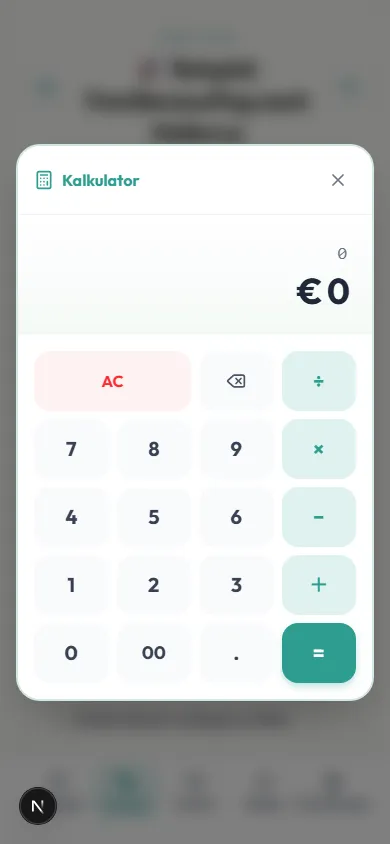
Ja. Ein Tipp auf das Taschenrechnersymbol neben dem Betragsfeld öffnet einen integrierten Taschenrechner. Summen oder Teilungen rechnest du direkt dort, und das Ergebnis wird automatisch ins Eingabefeld übernommen.
Ja, die Rechenformeln (z. B. 1200+450) werden automatisch an das Feld „Notiz“ der Ausgabe angehängt, sodass jeder nachvollziehen kann, wie der Betrag zustande kam.
Mit FAMI-KAN gibst du nur ein, wer wie viel und für wen bezahlt hat. Die App verrechnet die Schulden automatisch gegeneinander und zeigt den Abrechnungsweg mit der geringsten Anzahl an Überweisungen.
Du kannst für jeden Teilnehmer detaillierte Zahlungsverhältnisse (gewichtete Verteilung) festlegen und so fair abrechnen. Situationen wie „wer nichts getrunken hat, zahlt weniger“ lassen sich damit problemlos abbilden.
FAMI-KAN gibt das Ergebnis auf den Cent genau aus. Wir empfehlen, beim tatsächlichen Überweisen oder bei der Barzahlung innerhalb der Gruppe zu runden.
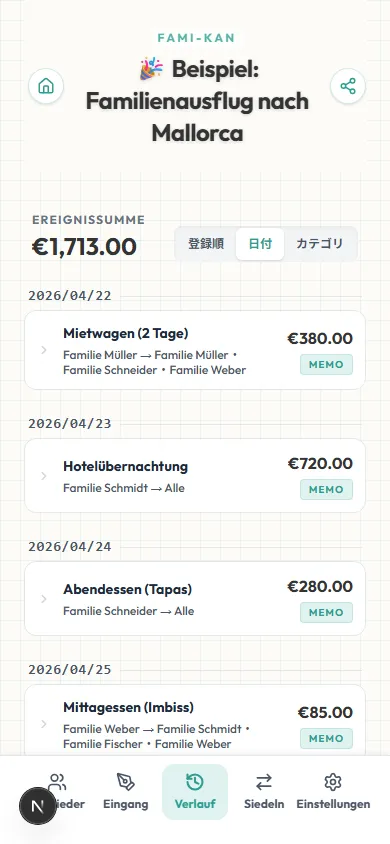
Ja. Die Verlaufsseite bietet drei Sortieroptionen: „Eingabereihenfolge“, „Datum“ und „Kategorie (Symbol)“. Ein Tipp darauf gruppiert und ordnet deine Ausgaben automatisch.
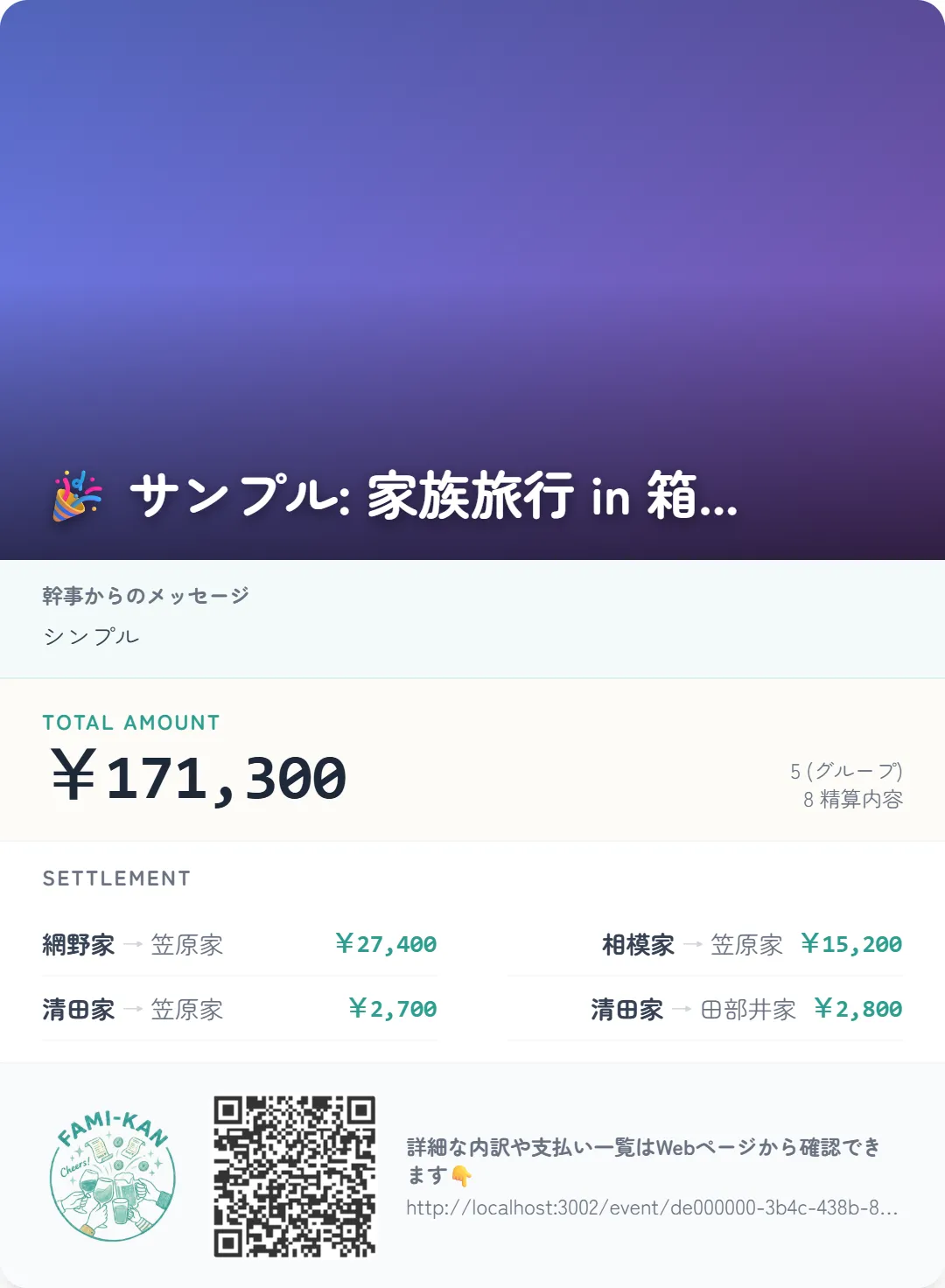
FAMI-KAN kann eine schöne „Abrechnungskarte“ als Bild erzeugen, mit Zusammenfassung und Zahlungswegen. Du kannst ein Titelfoto hochladen, einen Kommentar des Organisators hinzufügen, das Bild herunterladen und direkt über LINE oder soziale Medien teilen.
Im Gegensatz zu Splitwise hat FAMI-KAN KEIN tägliches Ausgabenlimit (du kannst 100+ Ausgaben pro Tag anlegen) und keine Bezahlfunktionen. Im Vergleich zu Tricount oder Splid unterstützt es auch komplexe Aufteilungen (wie Gemeinschaftskasse und eigene Verhältnisse), ohne dass eine Anmeldung nötig ist.
Überhaupt keine. Füge so viele Ausgaben hinzu, wie du möchtest – komplett kostenlos.
Diese Apps sind großartig für die eigentliche Zahlung, aber die komplexe Rechnerei „wer schuldet wem“ bei einer 5-tägigen Gruppenreise mit 20 gemeinsamen Ausgaben übernehmen sie nicht. FAMI-KAN rechnet – und du zahlst dann mit deiner bevorzugten Bezahl-App.
Ja. Keine komplizierten Formeln, kein Teilen von Tabellen-Links. Greif einfach vom Smartphone auf die URL zu – alle tragen ihre Auslagen in Echtzeit ein, und der Abrechnungsbetrag steht sofort fest.
Ja. Alle Funktionen zum Aufteilen und Abrechnen von Ausgaben in dieser Web-Anwendung sind kostenlos. Keine Registrierung und keine Begrenzung bei Ausgaben oder Personen.
Nein. FAMI-KAN läuft komplett im Browser. Du musst deine Freunde nicht dazu zwingen, etwas herunterzuladen oder sich anzumelden. Teile einfach die URL.
Derzeit ist eine Internetverbindung erforderlich, um Daten in Echtzeit über die Geräte deiner Gruppe zu synchronisieren.
Jedes Event erhält eine eindeutige zufällige URL (UUID v4) mit über 5,3×10³⁶ möglichen Kombinationen. Es ist praktisch unmöglich, deine Event-URL zu erraten. Persönliche Daten werden nie abgefragt.
Es gibt keine feste Speicherfrist. Daten, die seit 3 Jahren oder länger nicht aktualisiert wurden, können jedoch gelöscht werden. Wenn du die Abrechnungsergebnisse behalten möchtest, empfehlen wir, einen Screenshot zu speichern.
Ja. Du kannst die schreibgeschützte Teilen-Seite freigeben, indem du einen Link sendest, der auf `/share` endet. Andere Mitglieder sehen die Abrechnungsergebnisse, können aber keine Daten bearbeiten.